Before you put another hour into Twitter, now called X, check whether the people you want to reach are active there. Look for listeners in your genre, local venues, promoters, writers and other musicians. Read what they have posted recently. A large follower count on an abandoned account won’t help you book a gig.
X can be useful for conversations, release updates and finding people working in the same music scene. It deserves a place in your promotion plan if those people are there and you can give them something worth hearing or discussing.
Start with a clear profile, a few good music clips and a useful place to send anyone who wants more. Then measure what happens. You don’t need to spend the day filling a feed.
This guide was updated in October 2026. It uses Twitter where that is still the familiar term, and X for the current platform. Paid features and account eligibility can change, so the relevant sections link to X’s current documentation.
Is X worth using for your music?
Celebrity follower rankings tell you very little about whether an unknown band can find listeners. You need evidence from your own scene.
Search for a few comparable artists, venues you could realistically play and people who cover your genre. Look beyond whether the accounts exist. Are they posting, replying and announcing things you could take part in? Do listeners discuss the music, or does every post sit unanswered?
An account can still be useful for keeping existing fans informed or talking to collaborators, even if it brings few new listeners. Give it a specific job.
| What you want | What to do on X | A useful result to look for |
|---|---|---|
| Introduce a new song | Share a clip with a reason to listen and a release link | Visits to the release page and clicks to listen |
| Promote a local show | Post the city, venue, date and ticket link | Ticket-page visits, questions about the show and tracked sales where available |
| Meet collaborators | Join relevant conversations and share work in progress | A useful exchange, rehearsal or agreed collaboration |
| Keep listeners in touch | Explain what your email updates contain and link to signup | Confirmed subscribers |
Give yourself a limited trial, perhaps a month, with a time allowance you can maintain. That is a planning suggestion, not a claim about how long X’s algorithm takes to reward you. If you find little relevant activity and no useful response, put more work into a channel that is helping.
Twitter, Instagram or TikTok?
Choose according to the audience and the material you can make. A short performance, a conversation about recording and a local gig announcement may work differently on each account.
X gives you posts, replies, reposts and live audio conversations through Spaces. It can suit musicians who enjoy discussing music and talking with people in their scene. If maintaining the account feels like a daily argument with strangers, include that cost in your decision.
Instagram and TikTok also give you ways to share performances and reach listeners. There is no useful basis for declaring X universally easier or better for a musician starting out. Compare what your own posts produce over a similar period, with similar effort.
Our TikTok guide for musicians covers a separate approach to short performance clips. For planning a release across channels, start with the music marketing guide.
Write a Twitter bio that tells people what you play
Your X bio has a maximum of 160 characters. That is a character limit, not a reliable allowance of 20 or 30 words. The profile also has separate location and website fields, so use them.
Summarize who you are. Name the band, instrument or kind of music and include a useful current detail. Keep the artist name and photo recognizable across the places listeners might find you.
Don’t make jokes simply for the sake of being funny. If you put some humour in there, make it count. And don’t assume a stranger already knows who you are. Most people don’t know you yet.
These are fictional examples you can adapt:
- “Dublin guitarist and songwriter. Folk songs with a loud electric guitar. New single ‘Night Bus’ out now.”
- “Bristol jazz trio. Piano, bass and drums. Playing locally and recording our first EP.”
- “Singer and producer making electronic pop in Manchester. Demos, releases and occasional synth repairs.”
“Guitarist. Composer. Taco enthusiast.” has some personality. It still leaves a new visitor wondering what your music sounds like and where to hear it. Give them that information somewhere obvious.
Use a simple, relevant handle that is easy to read aloud and remember. If the exact artist name is taken, a consistent variation with your instrument, location or “music” can work. Check that it won’t be confused with another act.
Our musician bio guide has more help with short introductions and profile links.
Pin the thing you want a new visitor to find
X lets you pin a post to your profile. Use it for a strong introduction, the current release or an upcoming show. An old launch announcement is less helpful when the album is already six months old.
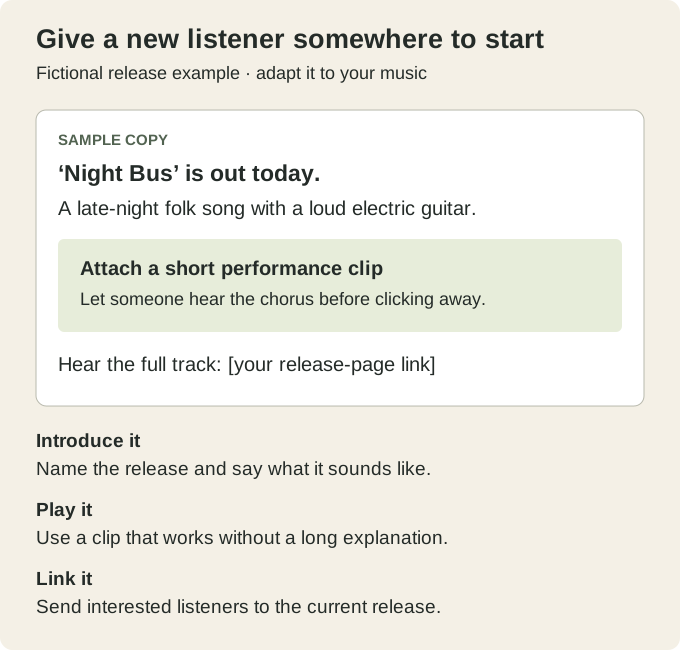
A pinned release post needs enough information to work on its own: the song or release name, something people can hear, a short reason to listen and the relevant link. A ticket post needs the city and date as well.
How to post music on X
Use a video when you want someone scrolling past to hear the music. A performance clip, rehearsal excerpt or a short piece of a finished video gives them something to judge before opening another page.
Upload the clip through the post composer, add a sentence that explains what they are hearing, then check the published playback. Listen on your phone as well as your recording setup. If the guitar buries the vocal, a caption won’t fix it.
X’s video guidance gives a standard limit of 140 seconds for accounts without Premium. Paid upload allowances vary by subscription and device. Check the current rules if you need a longer upload. A release teaser rarely needs to use the whole allowance.
Start at a part that makes sense without an introduction. Keep any spoken setup short. Caption speech and make important details readable on a phone. Use a recording you have permission to share, and keep the full version somewhere listeners can find it.
If you want people to leave X and listen, include a clear link and tell them what it opens. Check the destination on mobile. A streaming-service homepage or an expired ticket page makes the next step unnecessarily difficult.
For example: “The chorus took three rehearsals to stop rushing. Here’s where we ended up. Full track: [your release link].”
Use a detail from your own session. A specific observation gives people more to respond to than “Big things coming.”
Give people a reason to reply or listen
Be personal. Share something about yourself or the band in your posts, especially when it helps explain the music. A changed lyric, an unusual instrument or a live arrangement can start a conversation without turning your account into a diary.
Follow and interact with others whose work interests you. That could mean a local act, the engineer who recorded a record you like or a venue discussing its next show. Reply to the actual subject. Dropping your Spotify link under an unrelated post is an interruption.
When someone asks a reasonable question about a song or tags you after a gig, reply if you can. You don’t need a script for thanking someone who enjoyed the set.
What to post between release announcements
| Material you already have | A useful post |
|---|---|
| Rehearsal recording | A passage you changed, with a short explanation |
| Finished track | A strong excerpt with the title and listening link |
| Gig photo or live clip | The venue, a detail from the set and credit for the photographer |
| An arrangement decision | Two short versions and a specific question about the difference |
| A collaborator’s release | What you like about the music and a link to their work |
| An upcoming show | City, venue, date, lineup and ticket information |
You can ask questions without manufacturing a contest. “We tried the bridge with and without drums. Which leaves more room for the vocal?” gives people something to hear and discuss. An answer doesn’t oblige you to rewrite the song by committee.
Promote the release directly when there is something to announce. You don’t have to hide every sale behind a story. Make room for conversations and useful material between requests to buy, stream or attend.
Hashtags and posting frequency
Use a relevant event, genre or scene hashtag if it helps place the post in a conversation. Don’t add a trending topic that has nothing to do with the music. X’s authenticity rules prohibit several forms of content and engagement spam, including irrelevant hashtag abuse and bulk unsolicited replies or messages.
There is no dependable “tweet expires after 18 minutes” rule to build your schedule around. Start with a few worthwhile posts a week and reply when there is something to say. Repeat an announcement when the timing warrants it, with useful new information or a different clip.
Don’t pay for followers or use follow/unfollow schemes. An inflated number tells you little about who wants to hear the next song. Buying engagement and manipulating follows can also breach X’s rules.
Use Lists to keep up with your scene
X Lists collect posts from selected accounts into a separate timeline. Make one for venues and promoters, another for musicians and releases you want to follow. This gives you a manageable place to look without relying entirely on the main feed.
Lists are public by default. Choose Private if it is a working research list you don’t want to share. Treat it as a way to pay attention, rather than a database of people to message with the same pitch.
A good connection can start with a useful reply. If a promoter explains how to submit music, follow that process. Mentioning them repeatedly won’t improve the recording.
Try Spaces when there is a conversation worth hosting
X Spaces supports live audio conversations. Hosts can start a Space through the iOS or Android app, schedule it and invite speakers. Spaces are public, and a recorded session can remain available afterward.
A short discussion with a collaborator about a release, or a Q&A after a show, gives you a reason to invite people. Agree on a subject and approximate length, check the microphones and tell guests whether you plan to record. Leave time for questions.
Don’t book a weekly broadcast just because the button exists. Try one session, see who turns up and decide whether the conversation was useful to you and the listeners.
Should musicians pay for X Premium or ads?
A paid subscription and an advertising campaign are different expenses. Start with the feature or result you need before paying for either.
X’s paid-plan documentation covers features such as editing posts, longer uploads and different levels of reply prioritization. Subscriptions and feature access are changing, so check the current plan and checkout for your account. None of those features guarantees someone will like the music.
For ads, X currently requires eligible, verified advertiser accounts, along with compliance with its ad policies. Check eligibility before you build a campaign around the platform.
If you do test an ad, choose one outcome. A ticket sale in your city, a release-page visit and a new follower need different evaluation. Set a spending cap, use a relevant audience and make sure the page opens quickly and contains the thing you promised.
Use a clip that has already prompted some useful response if you have one. Run a small test you can afford to learn from, then compare the cost with the result. Paying to distribute a post doesn’t repair a weak offer or a broken link.
There is no need to reserve several months of wasted spending as a compulsory learning period. Stop when the campaign isn’t producing a result worth its cost.
Measure what happens after the post
X’s public view counts count views, not unique listeners. Repeat views can count, including your own. A post with 5,000 views has not necessarily introduced your song to 5,000 different people.
Use the post and account analytics available to you, but check access before paying for a reporting workflow. Dashboard features can differ by account and subscription. You can still track visits to your own website and review reports from your ticketing, email and music services.
For a release page you control, a tagged link could look like this:
https://your-band.example/releases/night-bus/?utm_source=x&utm_medium=social&utm_campaign=night_bus_release&utm_content=chorus_clipThis is an example URL. Replace it with your real page. Use a different utm_content value for the pinned post or rehearsal clip so you can distinguish them in analytics. Campaign tagging helps identify visits where measurement is available. It doesn’t prove a visitor streamed the whole song or bought a ticket on another service.
Review a few numbers once a week:
- Visits from your tagged links and clicks to the relevant listening or ticket page, where measured.
- Confirmed email signups, ticket purchases or orders you can actually attribute.
- Replies and conversations that led to something useful.
- Time and money spent maintaining the account.
Keep a short note beside each result. A show announcement and a discussion about guitar strings have different purposes. Judge them accordingly.
A manageable first month
Set up the profile and destination page first. Choose a handful of accounts you want to keep up with, then prepare a few clips from material you already have.
Over the following weeks, publish a mix of music, a useful announcement and something worth discussing. Spend a little time responding rather than scheduling another batch of identical links. If there is a real occasion for a Space, try one.
At the end of the month, compare the work with what it produced. Keep the parts that brought listeners, useful contacts or sales. Reduce the time if the account mostly gave you another place to check notifications.
Frequently asked questions
Do musicians need a Twitter or X account?
No. It is worth testing if listeners and people in your scene are active there. You can give it a limited role for updates or professional conversations while putting more effort into gigs, email or another social platform.
Should I pay for a social media manager?
That depends on your time, budget and workload. Someone can help edit clips, schedule announcements and manage routine questions while you handle the conversations that need your voice. Agree on what they can publish and how the work will be measured.
Should professional and personal accounts be separate?
A band account makes shared announcements easier. Individual accounts give members somewhere to speak for themselves. A solo musician may prefer one public account. Separate accounts add work, so choose according to what you need to share and who needs access.
How should I handle criticism?
Answer a fair question or correct a genuine mistake. You don’t have to answer every insult. Use mute, block and reporting tools where appropriate, and keep private customer or booking details out of a public argument.
Should I upload a full music video?
You can if your account’s current upload allowance supports it. A short performance or excerpt may be enough to introduce a song and send interested listeners to the full video. Compare what people actually watch and click before making a longer upload part of every release.
About the author
Keith has been a musician for over 30 years and writes about music software, recording and the practical work of making music.